






Key Takeaways
AI video is no longer something people experiment with. It's something they publish. So, the model you choose depends entirely on the job:
-
Kling works great for volume, speed, and consistency in high-rep UGC content
-
Sora sets the bar for realism and narrative depth in high-stakes brand visuals Runway offers creative freedom and iteration for VFX and stylized content
-
Veo delivers the best cinematic stability and 4K polish for agency-grade B-roll
AI video has officially moved from hype to habit. It powers TikTok creatives, YouTube automation, product demos, social ads, and even cinematic shots that once required a camera crew and a day on set.
But once you start producing at scale, reality hits. One render looks flawless. The next breaks a face, warps an object, or loses motion entirely. And with newer models showing up nonstop, knowing what's actually reliable is harder than ever.
At this point, the real question is no longer "Can AI make a video?" It is "Which model follows direction and produces footage you can actually ship?"
Four contenders rise to that level: Kling, Sora, Veo, and Runway. Let's see which ones deliver once you start calling the shots.
Kling vs Sora vs Veo vs Runway: Comparison Snapshot
Before diving into individual tools, here's a clear view of how Kling, Sora, Veo, and Runway stack up across the most critical metrics.
Why Choosing the Right AI Video Model Matters
Demos make every AI model look magical. Real production exposes what actually holds up.
Some nail realism but lose identity when the shot changes. Others handle motion well until style enters the frame. And some generate one perfect clip, only to collapse the moment you ask for twenty variations.
So to make this comparison practical, we evaluate Kling, Sora, Veo, and Runway on five performance signals that actually impact real workflows:
-
Realism: A close-up should survive scrutiny. Faces stay natural, products hold their shape, and backgrounds remain intact as the camera shifts. If realism breaks on a blink, a turn, or a step forward, the output is not ready for use
-
Motion Fidelity: Movement should look deliberate. Camera pans stay smooth, physics feel grounded, and tracking holds steady. Sliding feet, floaty bodies, or jittery motion signal weak control immediately
-
Temporal Consistency: Continuity makes or breaks editability. Characters must remain recognizable, props cannot quietly change design, and environments should stay intact across clips meant to belong together
-
Style Control: Whether you want a clean, cinematic, playful, or bold style, it should not bleed into motion or identity. When color, lighting, or mood drifts mid-clip, brand consistency is already lost
-
Speed & Cost: Production lives on iteration. You test ideas, refine angles, and generate variations. If each attempt takes too long, costs too much, or forces a restart, momentum disappears fast
These aren't theoretical benchmarks. They're the exact pressure points where teams either move forward confidently or lose hours fixing AI output.
Fun fact: The AI video generator market is set to hit 2.56 billion dollars by 2032. No surprise, since nearly 43% of marketers already use AI to ship more content than ever.
How Each AI Video Model Performs in Practice
Every creator walks into a project with a different priority: speed, realism, storytelling, or style. Each AI video generator supports those goals differently. Here, we unpack what each tool does best, where it struggles, and which workflow it naturally fits into.
1. Kling (Best for high-volume social content)
Ideal Use Case: UGC ads, faceless YouTube automation, and multi-shot sequences where identity consistency, smooth motion, and affordable scale matter most.
Kling is built for creators who move fast and test relentlessly. If your workflow involves shipping variations, iterating on hooks, or scaling faceless videos, it offers something most AI models struggle to deliver consistently: predictability.
Kling O1 is especially strong when multiple references need to work together. For example, you can blend a subject, a style palette, and an environment into one coherent output without drift or distortion.
Kling also handles background reconstruction well. You can rebuild entire environments or relight existing footage while keeping the subject intact, making it practical for ad refreshes, seasonal updates, or turning old creator clips into new assets.
What makes Kling stand out
-
Preserves motion integrity across fast cuts and repeated iterations
-
Delivers publish-ready clips without separate audio passes or re-sync work
-
Switches between Standard Mode (fast) and Professional Mode (higher fidelity)
-
Animates still images into sequences using start and end frame logic
As one Reddit user sums it up:
"Kling handles motion like a pro. Even during fast pans or dynamic subject movement, the model keeps detail intact rather than breaking or smearing."
Limitations
-
Complex lighting setups may flatten into neutral gradients
-
Artistic or highly stylized looks often require extra iterations or manual tuning
Verdict
Kling earns its place in production through reliability at scale, not visual spectacle. For performance marketers and automation channels, that's worth gold.
Choose Kling if
✅ You generate multi-shot content and need identity to hold across outputs
✅ Your videos depend on fast motion or camera movement that must survive iteration
✅ You prioritize volume and efficiency over one-off cinematic moments
2. Sora (Best for photoreal brand visuals and complex story scenes)
Ideal Use Case: Premium commercials, narrative product shots, and atmospheric scenes where realism and emotional continuity need to hold from start to finish.
If you want a video that feels filmed rather than generated, Sora sets the bar high. Light behaves the way a real lens would capture it. Motion follows believable physics. Most importantly, scenes hold together as they evolve rather than unravel mid-shot.
In the example below, Sora manages a scenario that breaks most generators. Crowds, animals, traffic, and environments all move at once without visual collapse.
Beyond realism, Sora excels at scene intelligence. Watch how actions lead to reactions in the video below, with scenes progressing logically rather than frame by frame.
What makes Sora stand out
-
Render lighting, shadows, and depth that behave like real optics
-
Sustain visual clarity across longer shots without softness or decay
-
Preserve character identity and physical continuity through complex scene changes
-
Guide scenes with plain language instead of rigid camera instructions
Here's what a genuine Reddit user had to say about Sora:
"I was able to create 20 short videos with very simple prompts and got usable results faster than with other tools. Often, I got what I wanted in a single generation."
Limitations
-
High realism comes at a cost, making large-scale iteration expensive
-
Longer or more complex scenes increase generation time significantly
Verdict
Sora is the model you use when the footage needs to pass as real, not just look impressive in isolation.
Choose Sora if
✅ Your video needs to hold up next to live-action footage
✅ You are producing fewer videos with higher creative stakes
✅ Narrative flow and cause-and-effect are central to the shot
3. Veo (Best for cinematic movement and high-end 4K visuals)
Ideal Use Case: Cinematic B-roll, polished explainers, and storytelling shots that require precise camera control, smooth motion semantics, and refined visual clarity.
Ever generated a great-looking clip only to watch it fall apart once the camera starts moving? Veo solves that exact problem. It focuses less on perfect individual frames and more on how a scene plays out over time.
You can see this clearly in the example below. By defining a start frame, an end frame, and a simple prompt, Veo fills in the motion between them so the sequence feels continuous rather than stitched together.
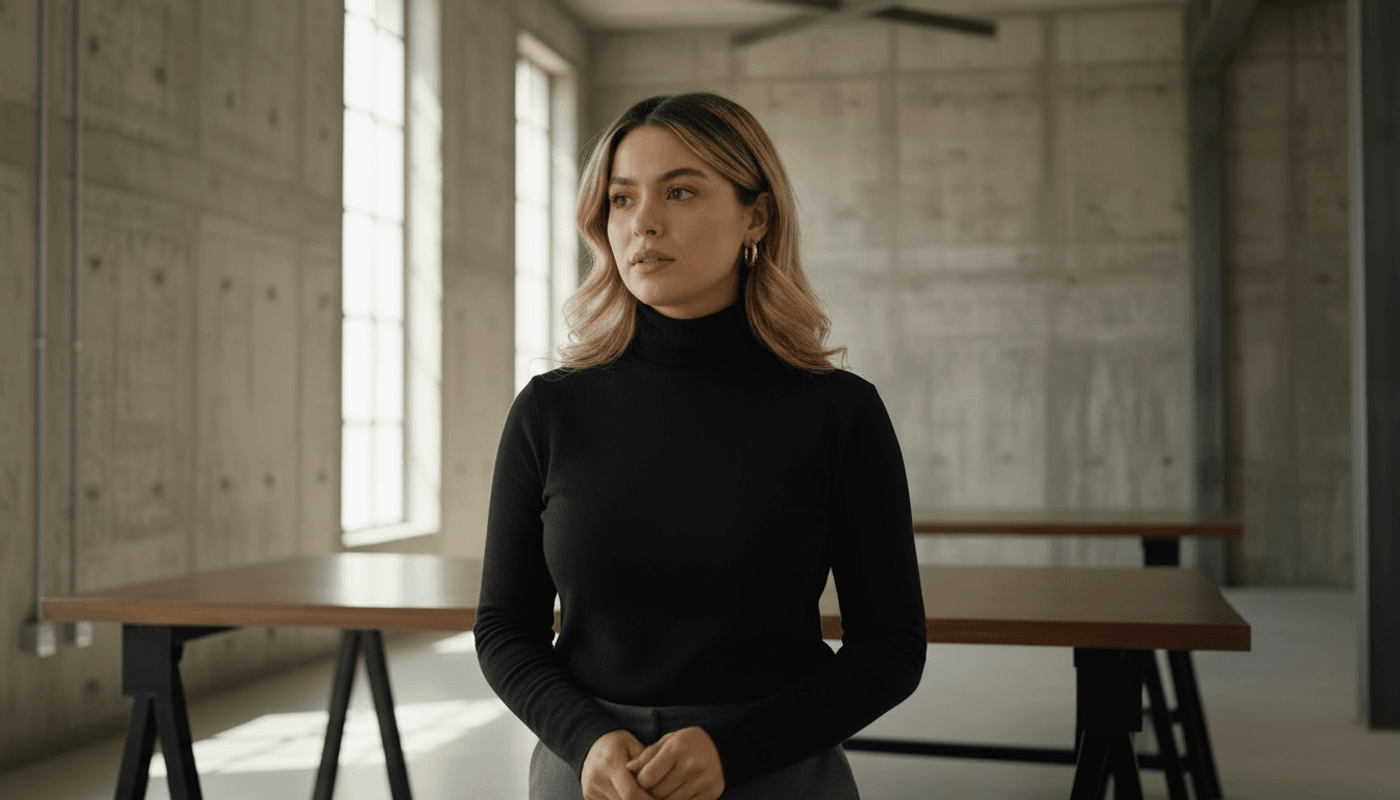
First frame
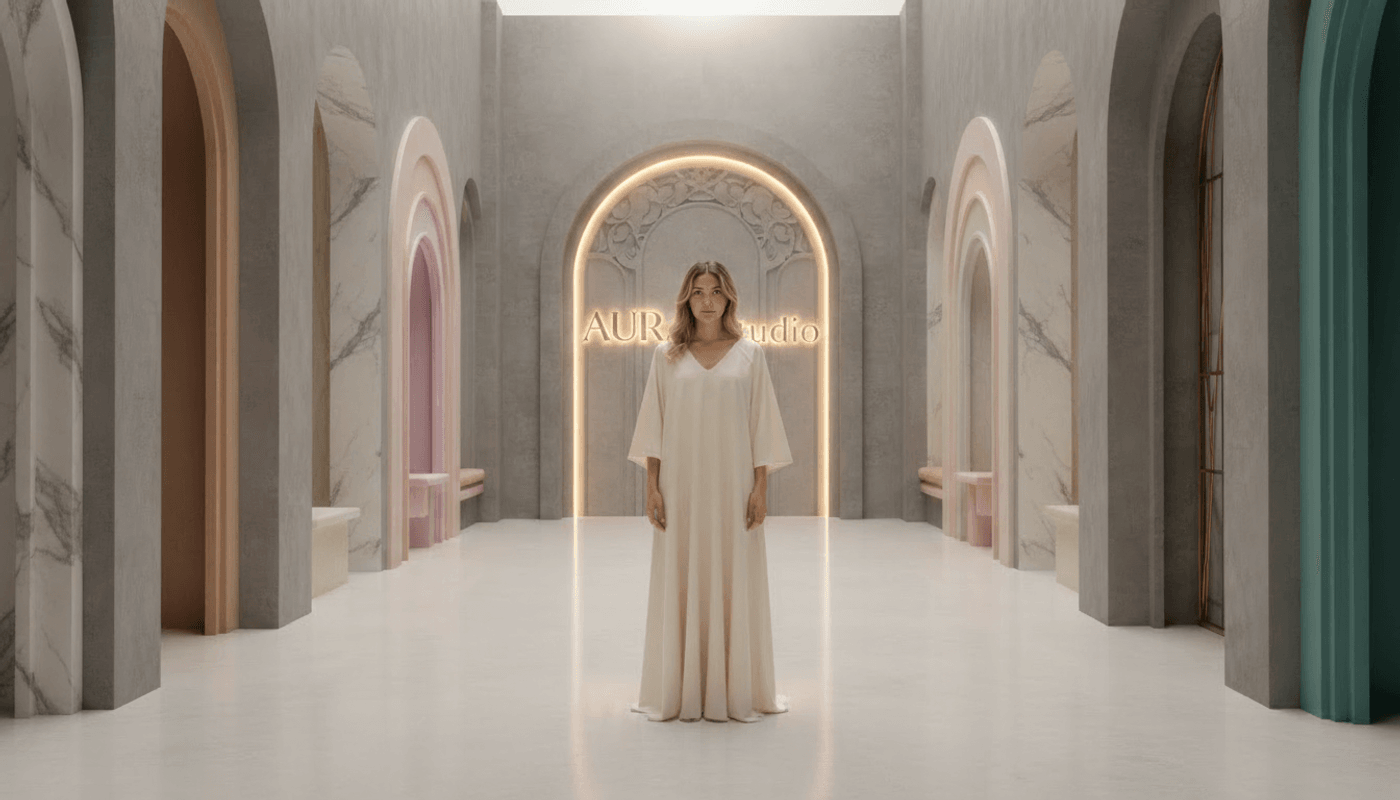
Last frame
Output
What makes Veo stand out
-
Control camera motion with predictable pacing and framing
-
Connect the start and end frames into a single continuous shot
-
Maintain visual polish across longer, uninterrupted sequences
-
Support high-resolution output without introducing motion jitter
See how this Reddit user sums Veo perfectly:
"Scenes no longer break between cuts. Characters stay consistent, motion feels natural, and the output reads as finished 4K footage."
Limitations
-
Require clearer visual intent to avoid overproduced motion
-
Scale less efficiently when dozens of variations are needed
Verdict
Veo is the reliable, high-end choice for agencies and production houses that demand technical polish, authentic camera work, and native sound integration.
Choose Veo if:
✅ You need stable cinematic camera motion at high resolution
✅ Your footage must feel polished without heavy post-production cleanup
✅ Sound design and visuals need to arrive together, not as separate steps
4. Runway (Best for rapid experimentation and creative workflows)
Ideal Use Case: TikTok/Reels content, design-led visuals, and VFX concepts where speed, experimentation, and bold stylistic shifts are essential.
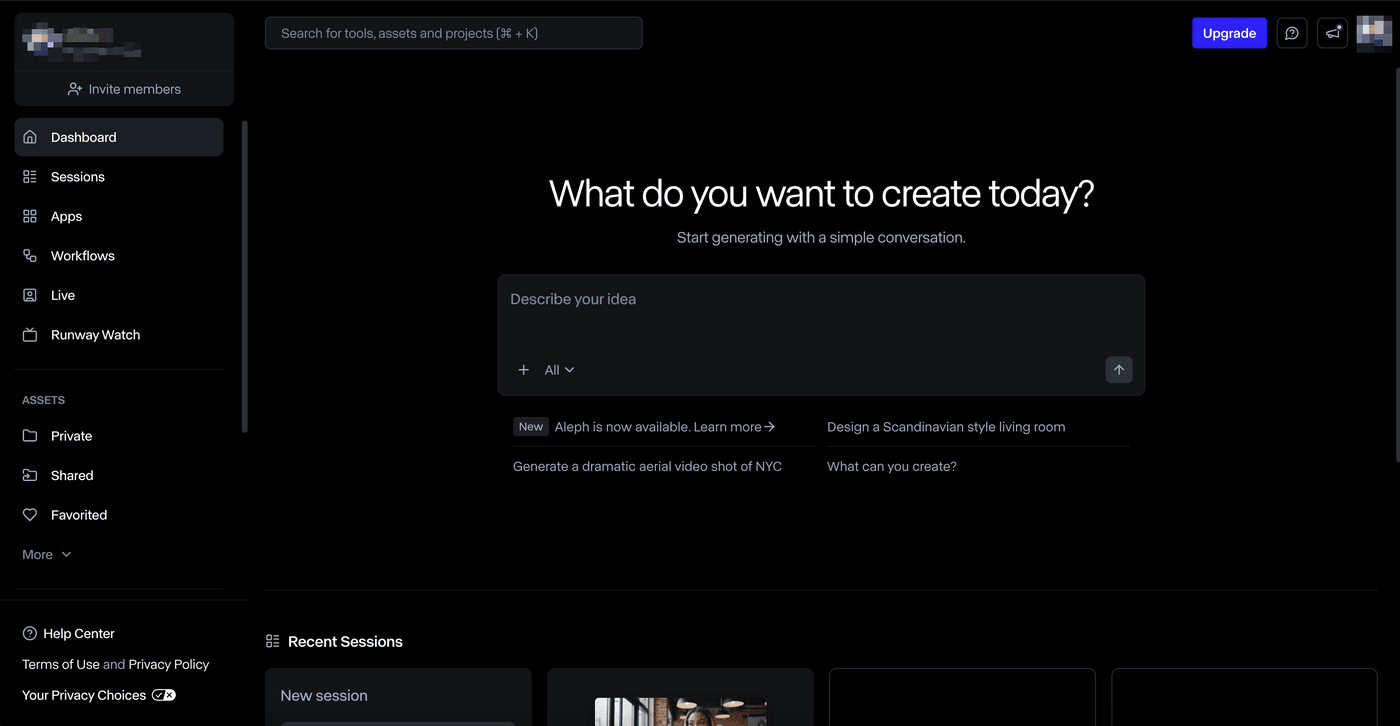
Runway is what you go for when the idea is still taking shape. You are not locking frames or protecting continuity yet. You are exploring looks, testing edits, and figuring out what actually works on screen.
That makes it a natural fit for short-form creators, designers, and teams working early in the creative process. Instead of treating generation as a single step, Runway treats it as a loop. You generate a clip, paint over it, extend it, remix it, or push it into a new direction.
What makes Runway stand out
-
Edit subjects inside an existing shot using text commands
-
Build original characters or AI versions of yourself using reference images
-
Generate from text, images, or video while keeping the output flexible
-
Refine motion, masks, and styles directly in the editor as ideas evolve
Check out what this G2 reviewer had to say:
"Runway has been the most reliable image-to-video tool I've used so far. The motion isn't always as dramatic as some other models, but there's less weirdness overall."
Limitations
-
Lower plans feel restrictive once you move beyond basic experiments
-
Long or narrative-heavy sequences need hands-on editing
Verdict
Runway is a creative sandbox, not a finishing machine. It helps teams find the idea faster.
Choose Runway if
 ✅ You are still shaping the visual direction
 ✅ You want to remix, edit, and experiment in one place
 ✅ Speed and creative freedom matter more than final polish
Common Mistakes to Avoid When Using AI Video Models
Even the best AI video models can fail due to a sloppy workflow. Use this checklist to catch problems before they cost you time, credits, or rework.
1. Be specific, not cinematic
Problem: Too much dramatic wording or competing instructions quickly degrades consistency. A prompt like this sounds impressive but lacks priority:
"Create an epic, emotional, hyper-realistic UGC-style video of a man wearing the Halstead Jacket with lifestyle shots, moody lighting, and fabric close-ups."
What works instead: Describe actions, order, and visual intent. Let style emerge after structure.
Prompt: Create a 30-second UGC-style video for the Halstead Chore Jacket.

Open with: "I'm obsessed with this jacket, and here's why."

Show putting it on at home, walking outside to show fit and movement, quick fabric and stitching close-ups, and end with it being folded or tossed into the wash.
2. Don't skip references
Problem: Without reference images or locked inputs, identity, style, and environments drift between clips. A prompt like breaks continuity:
"Generate a woman explaining our skincare product in a bright studio." Each render subtly changes her face, outfit, and background.
What works instead: Anchor identity and environment early.
Prompt: Use this reference image [@image] for the presenter. Keep the same outfit, hairstyle, and white studio background across all clips.
3. Review motion, not frames
Problem: A single frame can look flawless while the video quietly falls apart in motion. This prompt often passes at first glance, but in motion, the hand jitters, the watch slips position, or the wrist subtly morphs between frames.
"Create a clean product demo of a smartwatch on a wrist."
What works instead: Always evaluate movement over time, not stills.
Prompt: Create a 10-second product demo of a smartwatch on a wrist.
Show the hand rotating naturally, the watch face staying locked in position, and smooth transitions between angles without hand distortion.
4. Avoid mixing aesthetics
Problem: Stacking too many styles, tones, and execution rules into one prompt forces the model to compromise everything. The result feels visually confused:
"Create a 45-second animated musical short film with Disney-style cinematic visuals, anime motion, painterly textures, surreal magical effects, fast comedic timing, dramatic camera moves, and highly detailed environments. Include a child character, a goofy animal sidekick, musical vocals, captions, chorus effects, and emotional storytelling across multiple locations."
What works instead: Commit to one visual language and let everything else follow. When style is unified, motion, character design, comedy, and emotion stay aligned.
Prompt: Create a 45-second animated musical short film titled Lost & Found Friend.
Visual style: Disney-like, child-friendly cinematic animation with soft magical realism and a luminous tropical palette.
Characters: A small island girl and a colorful, goofy chicken. Keep character design consistent across all scenes.
Tone: Playful, warm, and gentle.
Structure: Clear scene progression from beach to jungle to lagoon to sunset farewell.
Pro Tip: Get the workflow right, and the models quickly reveal their strengths. From here, the choice becomes far more straightforward.
Which AI Video Model Should You Choose?
There is no single winner in the Kling vs Sora vs Veo vs Runway debate. Each model shines in a specific context.
Kling excels at speed and high-volume social output. Sora delivers unmatched realism and narrative coherence. Veo brings cinematic motion and polished camera work to the forefront. Runway remains the most flexible playground for experimentation and stylized creativity.
The trade-off is clear. No one model comfortably carries a project from idea to finished video on its own. As a result, many creators end up switching tools mid-project, juggling subscriptions, or rebuilding timelines just to move a video forward.
That's where platforms like invideo change how teams work. Instead of replacing these models, invideo brings them into a single workflow, making it easier to extend short clips into full videos, reuse generations efficiently, and move from concept to delivery with ease.
Start with invideo and experience what a unified AI video workflow looks like.
Also check out these related articles:
FAQs
-
1.
What are AI video generators?
AI video generators are tools that create short video clips using generative AI. You can type a text prompt or upload an image, and the model generates a video automatically using text to video or image to video technology.
-
2.
Is AI video cheaper than traditional production?
For short-form, testing, and iteration, yes. Costs rise for high realism or long sequences, but AI still reduces time, reshoots, and post-production overhead significantly.
-
3.
Is invideo beginner-friendly?
Yes. Invideo removes the learning curve. You start creating on day one, and the platform grows with you as your ideas get bigger.
-
4.
How can I use different AI models on Invideo?
Open the prompt page in your Invideo workspace. Click Agents and Models, then select the model you want, such as Sora, Kling, or Veo, before starting.
